Motion-computing M1400 Uživatelský manuál Strana 47

  • Stažení
  • Přidat do mých příruček
  • Tisk
  • Strana
    / 105
  • Tabulka s obsahem
  • ŘEŠENÍ PROBLÉMŮ
  • KNIHY
  • Hodnocené. / 5. Na základě hodnocení zákazníků
Zobrazit stránku 46
Chapter 4
Using Your Motion Tablet PC
Motion Computing M1400 Tablet PC User Guide 39
7. Tap Save. By default, this saves your document as a Windows Jour-
nal template (.JNT file) to My Documents/My Notes unless you
select another path.
NOTE: Windows Journal may take a few minutes to save, but even multi-page
documents will convert to a Journal Note Writer file.
8. If Windows Journal does not open your document automatically (an
option on the Save as page can be checked to “View note” after print-
ing), then open your Journal document manually.
9. Write with your pen on this document as you would any other Jour-
nal document (fill in your “form” or make your annotations).
10.Save your document with a new file name to preserve your edits.
You can save and reuse this document as many times as you want.
HAVE STICKY
NOTES HANDY
FOR JOTTING
DOWN
INFORMATION
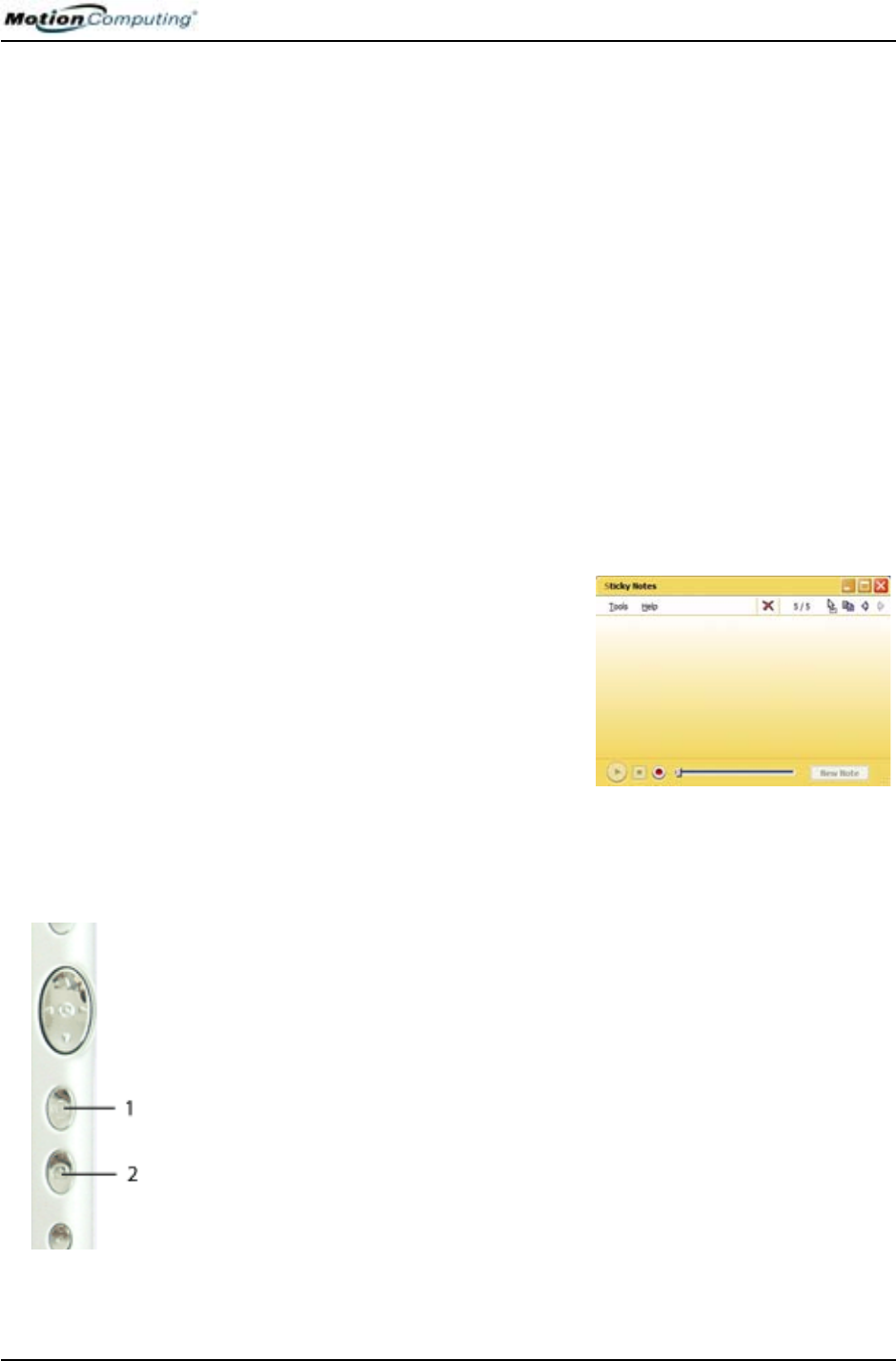
Sticky Notes provide a convenient way to store information like names,
phone numbers, simple maps, or other information that you would normally
put on a paper note. And since they are electronic, you can export them to
other programs. Sticky Notes are kept in a numbered stack that you can
browse through and discard when you are through with them.
They can also be used to record voice
notes (although you cannot drag the voice
notes to another program or the desktop).
Open Windows Journal from Start>All
Programs>Sticky Notes.
CHANGING
SCREEN
ORIENTATION
To change the display orientation:
From the Motion Dashboard
1. Press Hot # Key 1 (1) on the Tablet PC chassis to open the Motion
Dashboard.
2. Select the orientation: 0
o
, 90
o
, 180
o
, or 270
o
From the Tablet PC chassis
1. Press Hot # Key 2 (2) on the Tablet PC chassis. Each time you press
this key, the display rotates 90
o
.
2. Rotate the display to the desired orientation.
From the Tablet and Pen Settings Screen
1. Tap the Tablet and Pen Settings icon on the system tray, located at the
bottom right of the display window. Or, go to the Control Panel and
select the Tablet and Pen Settings icon.
2. From the Tablet and Pen Settings window, select the Display tab.
3. Tap the down-arrow next to Orientation.
4. Select the desired orientation: Primary landscape, Primary portrait,
Secondary Landscape, Secondary portrait.
Zobrazit stránku 46
1 2 ... 42 43 44 45 46 47 48 49 50 51 52 ... 104 105

Komentáře k této Příručce

Žádné komentáře

Samsung VC-8716H manuals

Owner’s manuals and user’s guides for Vacuums Samsung VC-8716H.
We providing 2 pdf manuals Samsung VC-8716H for download free by document types: User Manual


More products and manuals for Vacuums Samsung

Models Document Type
SC9273 User Manual   Samsung SC9273 User Manual, 31 pages
SC6540 User Manual   Samsung SC6540 User Manual, 56 pages
SR8750 User Manual   Инструкция по эксплуатации Samsung SR8750, 168 pages
VCDC20EH User Manual   Инструкция по эксплуатации Samsung VCDC20EH [es] , 48 pages
SC6890 User Manual   Инструкция по эксплуатации Samsung SC6890, 32 pages
SC61B3 User Manual   Инструкция по эксплуатации Samsung SC61B3, 48 pages
SC9631 User Manual   Инструкция по эксплуатации Samsung SC9631 [es] , 48 pages
SC6760 User Manual   Инструкция по эксплуатации Samsung SC6760, 32 pages
SC8852 User Manual   Инструкция по эксплуатации Samsung SC8852, 48 pages
SC07F80UC User Manual   Инструкция по эксплуатации Samsung SC07F80UC, 96 pages
VC-7413 User Manual   Инструкция по эксплуатации Samsung VC-7413, 8 pages
SC452A User Manual   Инструкция по эксплуатации Samsung SC452A [es] , 48 pages
SR8980 User Manual   Инструкция по эксплуатации Samsung SR8980, 160 pages
SC6260 User Manual   Инструкция по эксплуатации Samsung SC6260, 60 pages
VCMA16BS User Manual   Инструкция по эксплуатации Samsung VCMA16BS, 80 pages
VC-6915HT User Manual   Samsung VC-6915HT User Manual, 40 pages
SC5240 User Manual   Инструкция по эксплуатации Samsung SC5240 [fr] , 32 pages
SR8750 User Manual   Инструкция по эксплуатации Samsung SR8750, 128 pages
SC4760 User Manual   Инструкция по эксплуатации Samsung SC4760, 48 pages
VU12F40SBBT-AA User Manual     Samsung VU12F40SBBT-AA User Manual [fr] , 84 pages